Bike Computers Explained: Features, Benefits, and How They Work
Cycling has changed a lot over the years. Modern bikes are lighter, stronger, and more efficient than ever. At the same time, cycling technology has improved just as much. One of the most useful pieces of equipment for riders is the bike computer.
A bike computer does much more than display your speed. It can record your distance, track your route, monitor your fitness, and even guide you through unfamiliar roads. Some models keep things simple with only the basics, while others offer features that rival a smartphone.
The good news is that there is a bike computer for every type of rider. Whether you commute to work, enjoy weekend rides, train for races, or explore gravel roads, there is a model that fits your needs.
This guide explains exactly what bike computers are, how they work, and the different types available today.
What Is a Bike Computer?
A bike computer is a small electronic device that mounts to your bicycle’s handlebars or stem. Its main purpose is to collect ride data and display useful information while you are cycling.
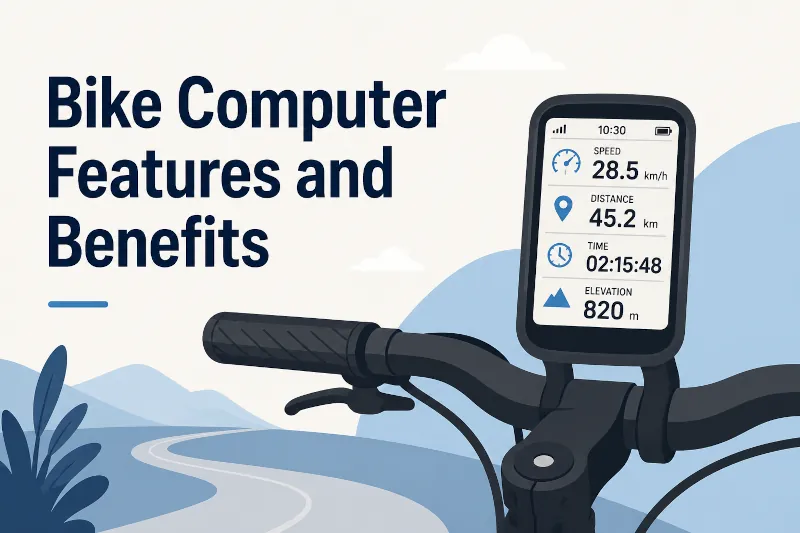
Depending on the model, a bike computer can display:
- Current speed
- Average speed
- Maximum speed
- Distance traveled
- Ride time
- Total mileage
- Time of day
- Elevation
- Heart rate
- Cadence
- Power output
- Navigation directions
Some computers focus on basic ride information. Others become the central hub for all your cycling data.
Unlike a smartphone, a bike computer is built specifically for cycling. It is easier to read in bright sunlight, uses much less battery power, and can handle rain, vibration, dirt, and rough trails without complaint.
How Do Bike Computers Work?
Bike computers measure and calculate information using one or more methods. The technology depends on the type of computer.
The three most common methods are:
- Wired wheel sensors
- GPS satellites
- Wireless sensors
Many cyclists wonder whether wired, wireless, or wireless GPS is better. Read on for more details, and also read our in-depth article about wired vs wireless bike computers.
Traditional Wheel Sensors
The earliest bike computers measured wheel rotations.
A small magnet attaches to one of the wheel spokes. A sensor mounts on the fork or rear chainstay. Every time the wheel completes one full revolution, the sensor detects the passing magnet.
The computer counts these rotations.
Before using the computer, you enter the circumference of your wheel. The computer multiplies the number of wheel rotations by the wheel circumference to calculate distance.
It also measures the time between wheel rotations to calculate speed.
This method is surprisingly accurate because it measures the actual movement of the wheel rather than estimating position from satellites.
However, it requires installing the sensor correctly and entering the correct wheel size.
GPS-Based Measurement
Many modern bike computers no longer need a wheel sensor.
Instead, they use signals from Global Navigation Satellite Systems (GNSS). These include:
- GPS (United States)
- GLONASS (Russia)
- Galileo (European Union)
- BeiDou (China)
Many bike computers can receive signals from several satellite systems at the same time.
The computer compares your position several times each second. By measuring how your position changes over time, it calculates:
- Speed
- Distance
- Route
- Ride location
GPS-based computers are easy to install because they require no magnets or wheel sensors.
Simply mount the device, wait for it to lock onto satellites, and start riding.
You may ask, why wouldn’t you just use your smartphone since it has GPS in it? Read our in-depth discussion about GPS bike computers vs using a smartphone.
Using Both GPS and Wheel Sensors
Some cyclists assume GPS replaces wheel sensors completely.
In reality, many premium bike computers support both.
A wheel speed sensor provides highly consistent speed data, especially in situations where GPS signals may become less reliable, such as:
- Dense forests
- Long tunnels
- Urban areas with tall buildings
- Indoor trainers
When both systems work together, the computer can produce even more consistent ride data.
How Do Bike Computers Measure Elevation?
Many bike computers show elevation and climbing statistics.
There are two main ways to do this.
GPS Elevation
Some entry-level GPS computers estimate elevation using satellite data.
This works reasonably well but is generally less precise than dedicated altitude sensors.
Barometric Altimeters
Many mid-range and premium computers include a barometric altimeter.
This sensor measures changes in air pressure.
As you climb higher, air pressure decreases. The computer uses these pressure changes to calculate elevation gain and total climbing.
Barometric measurements are generally more consistent during rides, especially on long climbs.
The Different Types of Bike Computers Explained
Bike computers come in several categories. Each serves a different type of cyclist.
Understanding these differences makes it much easier to choose the right model.
1. Traditional Sensor-Based Bike Computers
These are the classic bike computers that many cyclists remember.
They use a wheel sensor and magnet to calculate speed and distance.
Most display:
- Current speed
- Average speed
- Maximum speed
- Ride distance
- Trip time
- Total mileage
- Clock
Some models use a cable between the sensor and display.
Others communicate wirelessly.
Best For
- Casual riders
- Commuters
- Riders who want simple information
- Cyclists who rarely change bikes
Advantages
- Excellent speed accuracy
- Long battery life
- Affordable
- Easy to read
- No GPS required
Limitations
- No route recording
- No navigation
- Requires sensor installation
- Limited ride analysis
These computers remain popular because they simply work. Sometimes the simplest solution is still the best one.
2. Basic GPS Bike Computers
Basic GPS bike computers have become one of the fastest-growing categories.
They replace the traditional wheel sensor by using satellite positioning to calculate speed, distance, and ride time. Many riders choose them because installation takes only a few minutes.
Most basic GPS computers display:
- Current speed
- Average speed
- Maximum speed
- Distance
- Ride time
- Clock
- Trip statistics
Many also record your ride so you can upload it later to cycling apps.
Unlike more expensive models, these computers usually do not include full turn-by-turn navigation or detailed maps. Instead, they focus on delivering accurate ride information with very little setup.
Some models also allow optional connections to accessories such as:
- Heart rate monitors
- Cadence sensors
- Speed sensors
Others keep things simple and rely only on GPS.
Best For
- Recreational cyclists
- Fitness riders
- Commuters
- Riders upgrading from a traditional bike computer
Advantages
- Very easy to install
- No wheel magnet required
- Records rides automatically
- Good battery life
- Usually compact and lightweight
Limitations
- Limited navigation features
- Smaller displays than premium models
- Fewer training tools
For many cyclists, this category offers the best balance between simplicity, features, and price. If all you want is accurate speed, distance, ride time, and a record of where you rode, a basic GPS bike computer is often the perfect choice.
3. Fitness-Focused Bike Computers
Fitness-focused computers build on the features of basic GPS models by adding support for training sensors and performance tracking.
These devices appeal to riders who want to improve their fitness without stepping into full race-training territory.
They commonly support wireless connections to:
- Heart rate monitors
- Cadence sensors
- Speed sensors
- Smart indoor trainers
Many also calculate useful training metrics such as:
- Heart rate zones
- Calories burned
- Training time
- Weekly ride totals
- Recovery recommendations (on supported models)
After each ride, the computer syncs with a companion app where you can review your progress over time.
Instead of guessing whether you’re getting fitter, you can actually see the numbers.
In the next section, we’ll look at navigation-focused, performance, adventure, and smart bike computers, along with wireless sensor technology, battery life, accuracy, buying advice, frequently asked questions, and a conclusion.
Best For
Fitness-focused bike computers are a good choice for:
- Cyclists who ride several times each week
- Riders following a training plan
- People who want to improve endurance or speed
- Indoor and outdoor cyclists
- Anyone who enjoys tracking progress over time
Advantages
- Supports multiple fitness sensors
- Records detailed ride data
- Syncs with popular cycling apps
- Helps monitor training progress
- Suitable for both road and mountain biking
Limitations
- More expensive than basic GPS models
- Some advanced features require additional sensors
- Navigation features may be limited compared to premium models
For many recreational cyclists, this category offers all the features they need without the higher cost of a fully featured performance computer.
4. Navigation-Focused Bike Computers
Navigation-focused bike computers are built for riders who enjoy exploring new roads, bike paths, gravel routes, or mountain bike trails.
Unlike basic GPS computers, these models include detailed maps stored on the device. You can enter a destination or load a planned route before your ride.
As you cycle, the computer displays your position on the map and provides turn-by-turn directions.
Many navigation models also offer features such as:
- Route planning
- Route recalculation if you miss a turn
- Points of interest
- Saved favorite locations
- Climb profiles on supported routes
Many modern units allow you to create routes using a companion app or import routes from popular cycling websites.
This makes them especially useful for cycling holidays or long-distance rides in unfamiliar areas.
Best For
- Touring cyclists
- Gravel riders
- Bikepacking enthusiasts
- Riders exploring new areas
- Cyclists who enjoy long weekend rides
Advantages
- Built-in maps
- Turn-by-turn navigation
- Route planning
- Large color displays on many models
- Easy route recording
Limitations
- Higher purchase price
- Larger size
- Navigation uses more battery power
If you regularly ride somewhere new, a navigation computer can save a lot of stopping, guessing, and pulling out your phone every few miles.
5. Performance and Training Bike Computers
Performance bike computers are designed for riders who want detailed ride analysis.
Many competitive cyclists, triathletes, and serious enthusiasts use these computers to monitor training sessions and measure improvements over time.
These models often support a wide range of accessories, including:
- Heart rate monitors
- Speed sensors
- Cadence sensors
- Power meters
- Electronic shifting systems
- Smart indoor trainers
- Cycling radar devices
- Electronic bike lights
Many also display advanced performance metrics, including:
- Power output
- Training load
- Lap statistics
- Climbing performance
- Structured workouts
- Interval timing
Some models can guide riders through planned workouts by displaying instructions throughout the ride.
For example, the computer may tell you to ride at a certain power or heart rate for several minutes before beginning the next interval.
Best For
- Road racers
- Triathletes
- Competitive cyclists
- Serious training enthusiasts
Advantages
- Extensive performance analysis
- Supports many accessories
- Excellent ride recording
- Advanced workout features
- Large data storage
Limitations
- Higher cost
- More features than many riders need
- Learning curve for new users
These computers collect a huge amount of information. The challenge is often deciding which numbers to watch during the ride.
6. Adventure and Bikepacking Bike Computers
Adventure riding places different demands on a bike computer.
A rider may spend several days away from home, travel through remote areas, or ride for many hours between charging opportunities.
Adventure-focused computers often include:
- Long battery life
- Rugged construction
- Large internal storage
- Detailed offline maps
- Multi-day route support
- Weather resistance
- USB charging while riding on some models
Many can operate for well over a full day of riding before needing a recharge. Some also include battery-saving modes that extend operating time even further by reducing screen brightness or recording fewer GPS points.
Best For
- Bikepacking
- Long-distance touring
- Gravel adventures
- Ultra-distance events
Advantages
- Excellent battery life
- Reliable navigation
- Durable construction
- Handles remote rides well
Limitations
- Larger than entry-level computers
- More expensive
- Some advanced features may never be used by casual riders
7. Smart Bike Computers
Many modern bike computers now connect with other cycling technology.
These “smart” features improve convenience and safety.
Depending on the model, a smart bike computer may connect with:
- Smartphones
- Smartwatches
- Electronic shifting systems
- Cycling radar
- Smart lights
- Indoor smart trainers
Some smart computers can display:
- Text message notifications
- Incoming calls
- Calendar reminders
- Weather information
- Live ride tracking
Many riders also appreciate automatic ride uploads. When you finish your ride, the computer can transfer the data to your phone without pressing a single button.
What Are ANT+ and Bluetooth?
Modern bike computers often support ANT+, Bluetooth, or both.
These wireless technologies allow different cycling devices to communicate with each other.
Although they serve a similar purpose, they work slightly differently.
ANT+
ANT+ is widely used in the cycling industry.
A single ANT+ sensor can often send data to several compatible devices at the same time.
For example, your heart rate monitor may send data simultaneously to:
- Your bike computer
- An indoor trainer
- A sports watch
Many cycling accessories support ANT+ because it uses very little battery power.
Bluetooth
Bluetooth is common in smartphones, tablets, and computers.
Most bike computers use Bluetooth to:
- Sync ride data
- Update firmware
- Connect to companion apps
- Pair with compatible sensors
Many current bike computers support both ANT+ and Bluetooth, giving riders more flexibility when connecting accessories.
Common Sensors Used with Bike Computers
Bike computers become much more useful when paired with additional sensors.
Here are the most common ones.
Speed Sensor
A speed sensor measures wheel rotation.
Unlike GPS, it continues providing accurate speed data inside tunnels and areas with weak satellite reception.
Cadence Sensor
Cadence measures how quickly you pedal.
It reports your pedaling speed in revolutions per minute (RPM).
Many cyclists use cadence to maintain a smooth and efficient pedaling rhythm.
Heart Rate Monitor
A heart rate monitor measures how hard your body is working.
Training by heart rate helps riders control effort during long rides, recovery rides, and intervals.
Power Meter
A power meter measures the actual force applied to the pedals, crank, spider, or rear hub, depending on its design.
Power is measured in watts.
Many coaches consider power to be one of the most consistent ways to measure cycling performance because it directly reflects the work being done.
Power meters are generally used by experienced cyclists because they are more expensive than other sensors.
How Accurate Are Bike Computers?
Modern bike computers are generally very accurate when used correctly.
However, accuracy depends on several factors.
Traditional wheel-sensor computers can measure speed and distance with excellent precision if the correct wheel circumference is entered.
GPS computers are also very accurate for most rides. Small differences can occur if satellite signals are temporarily blocked by dense trees, steep cliffs, tunnels, or tall buildings.
Using both GPS and a wheel speed sensor often provides the most consistent results.
Barometric altimeters also tend to produce more reliable elevation data than GPS alone.
For everyday cycling, even entry-level GPS computers provide accuracy that is more than sufficient for tracking rides and monitoring progress.
Battery Life
Battery life varies depending on the type of bike computer.
Traditional sensor-based computers often use small coin-cell batteries that can last many months or even several years because the display and sensors use very little power.
Rechargeable GPS computers usually last anywhere from several hours to well over 30 hours on a single charge, depending on:
- Screen brightness
- GPS settings
- Navigation use
- Connected sensors
- Wireless features
Using maps and navigation generally reduces battery life faster than displaying basic ride data.
Some adventure-focused models include battery-saving modes that extend ride time for very long trips.
Choosing the Right Bike Computer
The best bike computer depends on how and where you ride.
If you mainly ride around town or on familiar routes, a traditional sensor-based computer or a basic GPS model may be all you need.
If you enjoy tracking your fitness, choose a model that supports heart rate and cadence sensors.
If you often ride in unfamiliar areas, built-in maps and turn-by-turn navigation can make every ride easier.
Competitive cyclists usually benefit from a performance-focused computer that supports power meters, structured workouts, and detailed ride analysis.
For long-distance touring and bikepacking, battery life and reliable offline maps should be high on your list.
The good news is that there is no single “best” bike computer. The right choice is the one that provides the features you will actually use.
Why Use a Bike Computer Instead of a Smartphone?
Many cyclists already carry a smartphone, so it is fair to ask why anyone would buy another device.
The answer comes down to reliability and convenience.
A bike computer stays securely attached to your handlebars and is designed to be viewed while riding. The screen remains visible even in direct sunlight, and the battery often lasts much longer than a phone running GPS continuously.
Bike computers are also built to survive conditions that can damage a smartphone, including heavy rain, mud, vibration, and accidental drops.
Another advantage is compatibility with cycling accessories. Many bike computers can connect to heart rate monitors, cadence sensors, speed sensors, and power meters. This creates a complete picture of your ride that a smartphone alone usually cannot provide.
Think of it this way: your phone is a Swiss Army knife, while a bike computer is a dedicated cycling tool. Both are useful, but each has its strengths.
Frequently Asked Questions
Do I need a bike computer if I already have a smartphone?
No. Many cyclists use a smartphone for ride tracking. However, a bike computer is easier to read in sunlight, usually has much longer battery life while recording rides, mounts securely on the bike, and connects with a wider range of cycling sensors.
Are GPS bike computers accurate enough without a wheel sensor?
Yes. Modern GPS bike computers provide excellent accuracy for most rides. Adding a wheel speed sensor can improve consistency in places where satellite signals are weak, such as tunnels or heavily wooded areas.
Can I use a bike computer on different bicycles?
Yes. Most bike computers can be moved between bikes by installing additional mounts. If you use wheel sensors, each bike will need its own compatible sensor.
Do all bike computers need the internet?
No. Traditional bike computers do not use the internet. GPS bike computers communicate directly with satellites, which also does not require an internet connection. An internet connection is usually only needed when syncing rides, downloading maps, or updating software.
Are bike computers waterproof?
Most modern bike computers are designed to resist rain and wet riding conditions. Many meet recognized water-resistance standards. However, water-resistant does not always mean they are intended for prolonged underwater use.
Can a bike computer help me improve my fitness?
Yes. Many bike computers record ride history, speed, distance, heart rate, cadence, and power. Reviewing this information over time can help you monitor progress and train more effectively.
Wrapping it up
Bike computers have grown from simple speedometers into powerful cycling tools. Whether they use a wheel sensor, GPS, or a combination of both, their purpose remains the same: to provide useful information that helps you enjoy your ride.
Today’s market offers a bike computer for every cyclist. Traditional sensor-based models remain an excellent choice for riders who want straightforward speed and distance data. Basic GPS bike computers make setup simple while accurately tracking rides without a wheel sensor. Fitness models add support for heart rate and cadence monitoring. Navigation computers guide you through unfamiliar roads, while performance models deliver detailed training data for riders who want to measure every effort. Adventure-focused computers prioritize battery life and reliable mapping for long days in the saddle.
The best bike computer is not the one with the longest feature list. It is the one that matches your riding style and gives you the information you find useful. Whether your goal is a daily commute, a relaxing weekend ride, a century event, or your fastest personal best, the right bike computer can help you ride with greater confidence, track your progress, and spend more time enjoying the journey. After all, every great ride deserves a good story—and a bike computer makes it much easier to remember the details.

by: Cory Willins
Cory is a dynamic and passionate content writer, specializing in sports-related topics. With over a decade of experience in the field, Cory has established… read more